Too close: the minimum focus distance
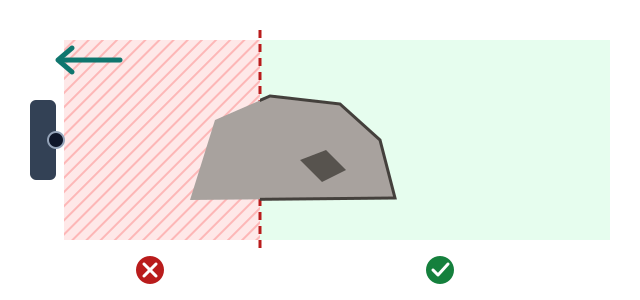
Every lens has a minimum focus distance. Any part of the subject nearer than that cannot be made sharp, and stacking cannot fix it afterwards.
The principle
A lens focuses by moving its glass, and the glass can only move so far, so there is a closest distance it can focus on.
Each lens on the same phone has a different limit; lenses with more magnification usually have a farther minimum distance. The app shows on screen how close the current lens can focus.
What to do
- Move the phone back until even the nearest part of the subject is in the focusable range.
- Or switch to a lens with a closer minimum focus distance.
- Or clip on a macro lens to bring the focus distance closer.
The trade-off
After stepping back the subject looks smaller, but every part of it is sharp. Too close, the subject looks bigger but one part of it will always be blurred.
More basics
Why one photo is not sharp: depth of field and focus stackingThe closer you shoot, the thinner the sharp zone. Stacking merges the sharp parts of many photos.Subject depth: start at the nearest pointTap the part of the subject nearest to you; the app shoots from there back through the depth you set.
These are the basic principles. The best way to shoot depends on you and on the subject — try a few times and you will find your own way.